Common Firewall Rules: A Rule-by-Rule Configuration Guide
• Nathaniel Miller
A firewall only protects you if the rules are right. This guide covers the common firewall rules most networks need: the specific allow and deny rules, the order to put them in, and the ones that quietly leave you exposed.
Start with the table, then read the reasoning underneath it.
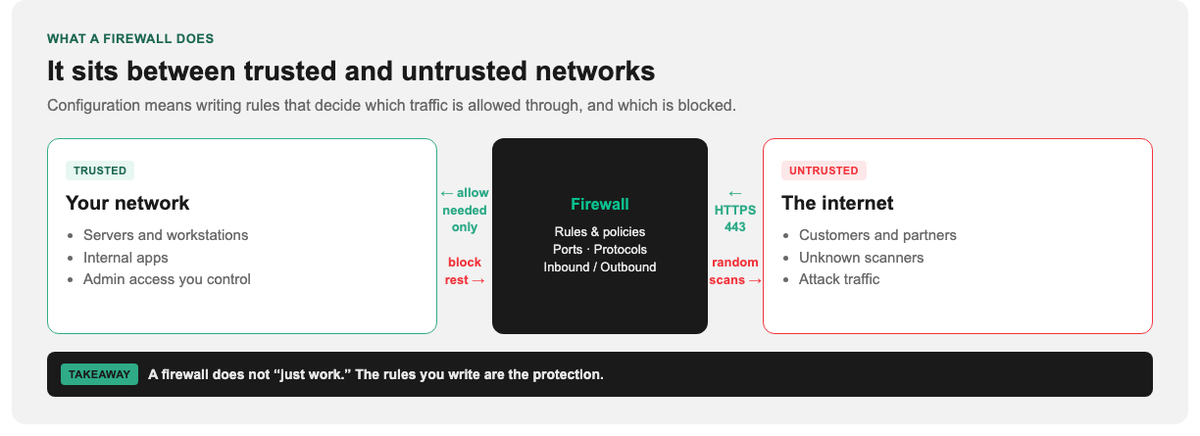
The firewall is not the protection by itself. The rules you write are.
The Firewall Rules Every Network Needs
This is a baseline rule set for a typical business network. Rule numbers reflect evaluation order: firewalls match top to bottom and stop at the first hit.
| # | Rule | Direction | Port / Protocol | Action | Why |
|---|---|---|---|---|---|
| 1 | Allow established/related | Inbound | Any (stateful) | Allow | Return traffic for connections you already permitted. Without it, nothing works. |
| 2 | Allow loopback | Both | Any on 127.0.0.1 | Allow | Local services talk to themselves. Blocking this breaks applications. |
| 3 | Allow admin SSH from jump host | Inbound | TCP 22, source = admin subnet only | Allow | Never open 22 to the internet. Scope it to known IPs. |
| 4 | Allow admin RDP from jump host | Inbound | TCP 3389, source = admin subnet only | Allow | Same logic. RDP exposed to the internet is the single most exploited entry point. |
| 5 | Allow HTTPS to web servers | Inbound | TCP 443 to DMZ web hosts | Allow | Public web traffic, destination-scoped to the web tier only. |
| 6 | Allow HTTP to web servers | Inbound | TCP 80 to DMZ web hosts | Allow | Only if you redirect to HTTPS. Otherwise drop it. |
| 7 | Allow DNS to resolvers | Outbound | UDP/TCP 53 to approved resolvers | Allow | Scope to your resolvers so malware cannot use DNS tunnelling to arbitrary servers. |
| 8 | Allow NTP | Outbound | UDP 123 to approved time sources | Allow | Clock drift breaks authentication, certificates, and logging. |
| 9 | Allow VPN termination | Inbound | UDP 500/4500 or TCP 443 to VPN concentrator | Allow | Remote access arrives here, not through exposed management ports. |
| 10 | Deny management ports from internet | Inbound | TCP 22, 23, 3389, 5900, 161 | Deny + log | Explicit deny above any broad rule, so it is visible in logs. |
| 11 | Deny SMB/NetBIOS at the perimeter | Both | TCP 139, 445, UDP 137 to 138 | Deny + log | File sharing should never cross the perimeter. This is how ransomware spreads. |
| 12 | Default deny everything else | Both | Any | Deny + log | The catch-all. Everything not explicitly allowed above stops here. |
Two things to notice. Rule 12 is the foundation but sits last. It only works because the allows above it are specific. And every deny rule logs, because a deny you cannot see is a deny you cannot troubleshoot.
Rule Order: First Match Wins
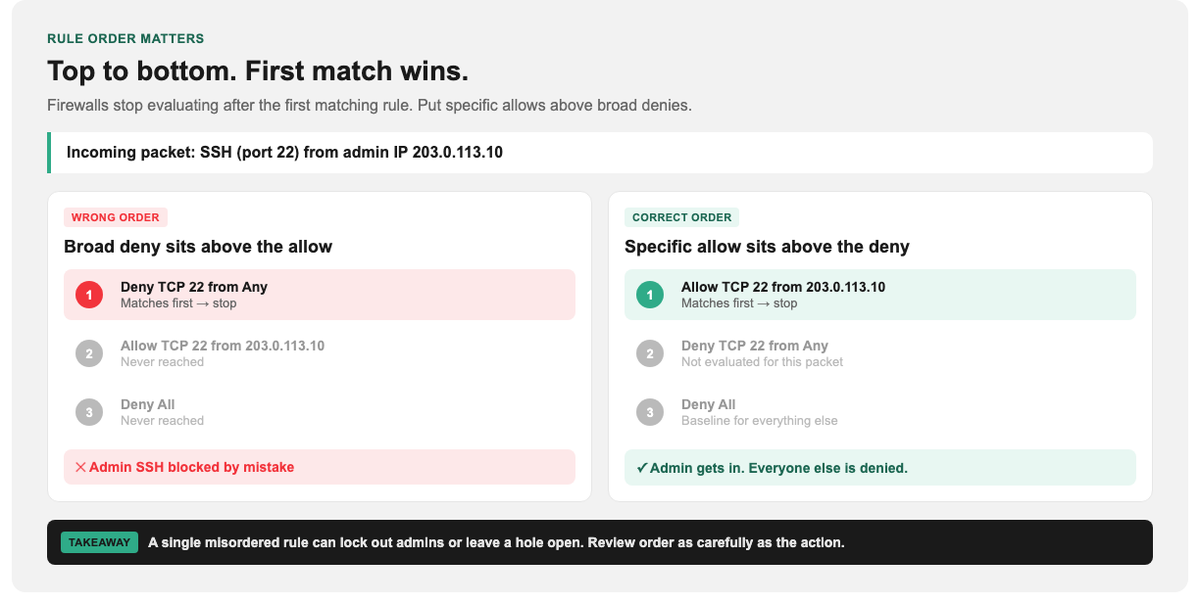
Put specific allows above broad denies, or the right rule never runs.
Firewalls evaluate top to bottom and stop at the first match. A perfectly written rule does nothing if a broader rule above it matches first.
The order that works:
- Stateful/established: return traffic, first, always.
- Specific allows: individual services, scoped by source and destination.
- Specific denies: the things you want logged by name.
- Broad denies: the catch-all default deny.
The classic production mistake is putting a broad deny inbound any above a specific allow 443 to web server. The web server goes dark and the rule looks correct in isolation. Always read your rule set top to bottom and ask what matches first.
Default Deny: The Rule Everything Else Depends On
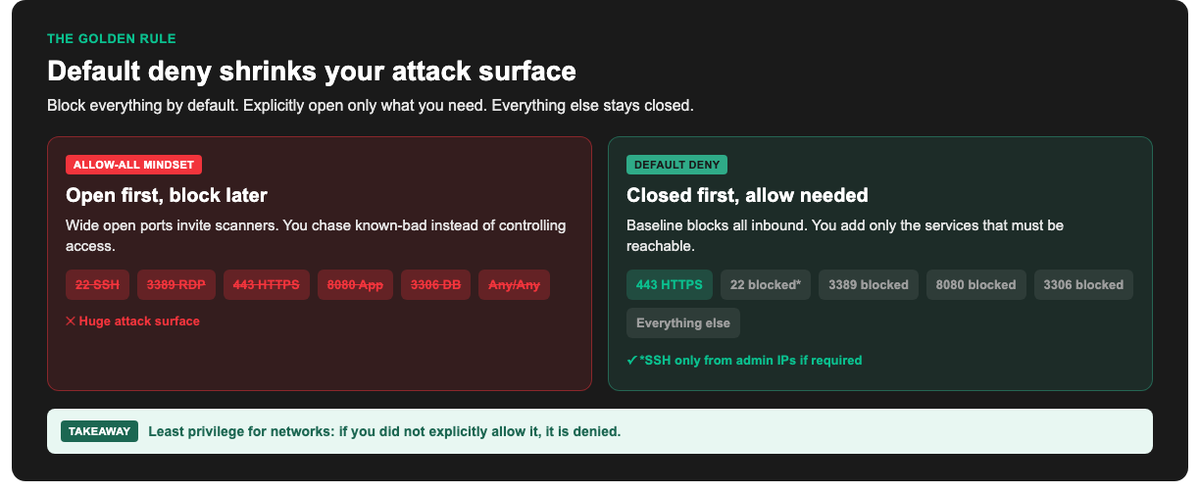
Least privilege for networks: if you did not explicitly allow it, it is denied.
Default deny means blocking everything, then explicitly permitting only what you need, rather than allowing everything and blocking known-bad.
The difference matters because you cannot enumerate every threat, but you can enumerate your own services. A default-allow firewall is only as good as your list of bad things, which is always incomplete. A default-deny firewall is as good as your list of legitimate services, which you actually control.
In practice: set the baseline policy to deny inbound and outbound, then add rules 1 to 11 above.
Allow Rules by Port: What to Open and What to Never Expose
| Service | Port | Open to internet? | Notes |
|---|---|---|---|
| HTTPS | TCP 443 | Yes | Scope to the web tier, not the whole network. |
| HTTP | TCP 80 | Only to redirect | Serve a 301 to HTTPS and nothing else. |
| SSH | TCP 22 | No | Admin subnet or VPN only. |
| RDP | TCP 3389 | No | VPN only. The most-attacked port on the internet. |
| SMB | TCP 445 | Never | Perimeter-blocked without exception. |
| Telnet | TCP 23 | Never | Unencrypted. Disable the service entirely. |
| SNMP | UDP 161 | No | Internal monitoring networks only. |
| DNS | UDP/TCP 53 | Outbound, scoped | To approved resolvers only. |
| SMTP | TCP 25 | Outbound, scoped | From your mail server only, or attackers relay through you. |
| Databases | 1433, 3306, 5432 | Never | Application tier only. A database on the internet is a breach in waiting. |
Inbound vs Outbound Rules
Most teams write careful inbound rules and leave outbound wide open. That is half a firewall.
Inbound rules stop attackers getting in. Outbound rules stop compromised machines phoning home, exfiltrating data, or spreading. If a workstation gets infected and outbound is allow any, the firewall contributes nothing to containment.
Minimum viable outbound control: allow DNS to your resolvers, NTP to your time sources, HTTP/HTTPS to the internet, SMTP from the mail server only, then default deny. That alone breaks most commodity malware’s command-and-control.
Common Firewall Rule Mistakes
- Allow any/any. Usually added “temporarily” during troubleshooting and never removed. It defeats the entire firewall.
- Management ports exposed. SSH, RDP, and admin interfaces reachable from the internet are found by scanners within hours.
- Rule sprawl. Rules accumulate for systems that no longer exist. Each one is an unreviewed hole. Audit quarterly.
- No logging on denies. You are blind to both attacks and your own misconfigurations.
- Outbound ignored. See the inbound vs outbound section above.
- Source set to any when it could be scoped. If only three admin IPs need SSH, say so in the rule.
How Rules Differ by Firewall Type
The rules above transfer across platforms. The syntax does not.
Host-based firewalls (Windows Defender Firewall, Linux iptables/firewalld, ufw) protect a single machine. Useful as a second layer, especially on servers in a shared subnet.
Network firewalls (Palo Alto, Fortinet FortiGate, Cisco) sit at the perimeter or between segments and carry the rule set above.
Next-generation firewalls add application awareness, deep packet inspection, and intrusion prevention, so a rule can say “allow Salesforce” rather than “allow 443.” Powerful, but they still rest on default deny and first-match-wins. The NGFW features are additions to this foundation, not replacements for it.
Testing and Reviewing Your Rules
After any rule change:
- Verify legitimate traffic still flows. Test each service you intended to allow.
- Verify the denies actually deny. Scan your own perimeter from outside.
- Check the logs. Your deny rules should be logging hits. Silence usually means a rule above is matching first.
- Review quarterly. Remove rules for decommissioned systems, and re-scope any rule with
anyas a source.
Build Real Network Security Skills
Firewall rules are a hands-on skill, and the gap between a rule set that looks right and one that is right is where breaches happen. StormWind Studios runs live, instructor-led training in network security and enterprise firewall platforms, where you configure real policies with an expert who catches the misordered rule before production does.
Start with CompTIA Security+ for the security foundation and CompTIA Network+ for networking context. For platform depth: Fortinet NSE7 Enterprise Firewall, Palo Alto PCNSE, or Implementing Cisco Meraki Firewalls. Moving to cloud security architecture next? See CCSP.
Frequently Asked Questions
What are the most common firewall rules?
A baseline set: allow established/related traffic, allow scoped admin access on SSH and RDP, allow HTTPS to web servers, allow DNS and NTP outbound to approved servers, explicitly deny management ports and SMB from the internet, then default deny everything else.
What order should firewall rules be in?
Top to bottom: stateful/established first, then specific allows, then specific denies, then the broad default deny. Firewalls stop at the first match, so a specific rule placed below a broad one never runs.
What is the default deny rule?
A catch-all rule at the bottom that blocks any traffic not explicitly permitted above it. It is the foundation of least-privilege networking: you permit your known services rather than trying to block every possible threat.
Which ports should never be open to the internet?
SMB (445), Telnet (23), RDP (3389), SNMP (161), and database ports (1433, 3306, 5432). SSH (22) should be restricted to an admin subnet or VPN rather than exposed.
Do I need outbound firewall rules?
Yes. Inbound rules stop intrusions; outbound rules contain them. Without outbound control, a compromised machine can freely contact command-and-control servers and exfiltrate data.
How often should firewall rules be reviewed?
Quarterly at minimum, and after any infrastructure change. Rule sprawl (old rules for decommissioned systems) is one of the most common sources of unnoticed exposure.