What Is SQL? A Beginner’s Guide with Examples
• Nathaniel Miller
SQL is the language used to talk to databases: to store, retrieve, and analyze data. If you work with data in any capacity, understanding SQL is one of the highest-leverage skills you can build. This guide explains what SQL is, what it is used for, and the core commands, in plain English.
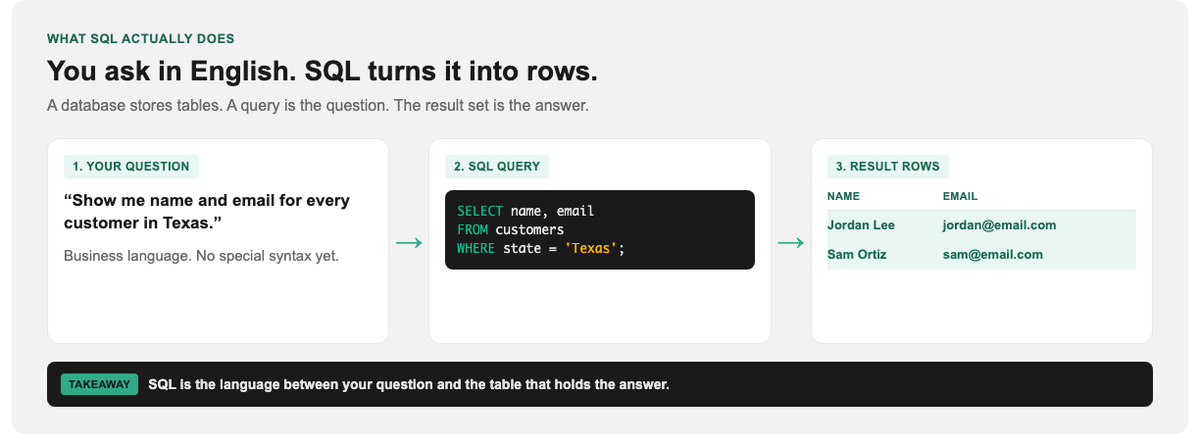
SQL sits between your question and the rows that answer it.
What Is SQL?
SQL stands for Structured Query Language. It is the standard language for communicating with relational databases: systems that store data in tables of rows and columns, like a giant, powerful spreadsheet. When you want to ask a database a question (“show me every customer in Texas who ordered last month”), you write that question in SQL.
Almost every application you use is backed by a database, and SQL is how developers, analysts, and administrators interact with the data inside. It has been the dominant data language for decades, and it remains one of the most in-demand skills in tech and business alike.
What Is SQL Used For?
- Retrieving data: pulling specific records out of massive datasets
- Analyzing data: aggregating, filtering, and summarizing to answer business questions
- Managing data: inserting, updating, and deleting records
- Building and structuring databases: creating the tables and relationships that hold data
Data analysts use it to build reports. Developers use it to power applications. Marketers, product managers, and finance teams increasingly use it to answer their own questions without waiting on an engineer.
Relational Databases: The Basics
SQL works with relational databases, where data lives in tables. Each table stores one kind of thing, a Customers table or an Orders table, with rows (individual records) and columns (attributes like name, email, date). Tables can be linked together (related) through shared keys, which is what makes the data model so powerful. Popular SQL databases include MySQL, PostgreSQL, Microsoft SQL Server, and SQLite.
The Core SQL Commands
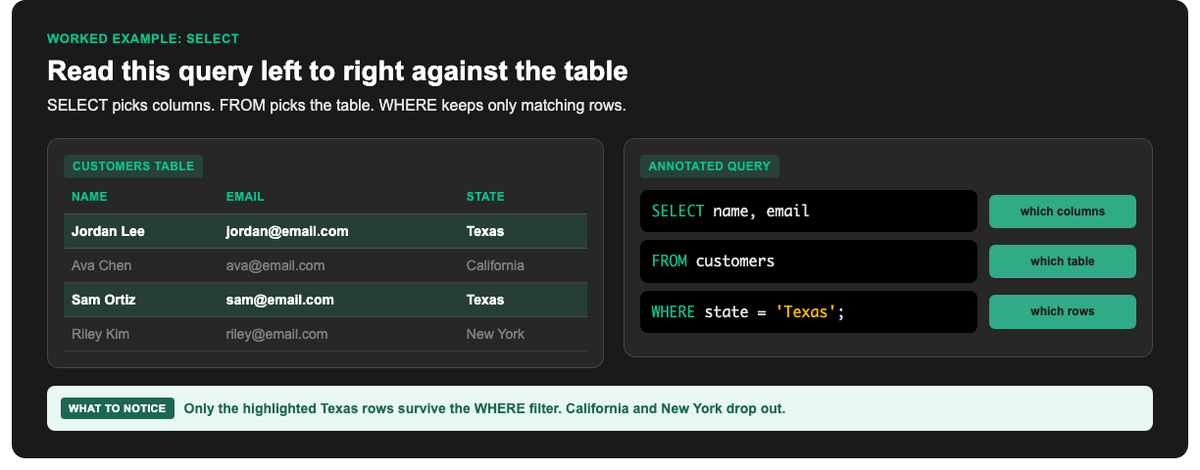
SELECT picks columns, FROM picks the table, WHERE keeps matching rows.
Most everyday SQL revolves around a handful of commands. Here are the essentials:
SELECT: retrieve data
The most common command. It asks the database to return data.
SELECT name, email
FROM customers
WHERE state = 'Texas';
This reads: “Give me the name and email from the customers table, but only where the state is Texas.”
INSERT: add new data
INSERT INTO customers (name, email, state)
VALUES ('Jordan Lee', '[email protected]', 'Texas');
UPDATE: change existing data
UPDATE customers
SET state = 'California'
WHERE name = 'Jordan Lee';
DELETE: remove data
DELETE FROM customers
WHERE name = 'Jordan Lee';
On UPDATE and DELETE, the WHERE clause is not optional in practice. Without it, you can change or wipe every row in the table.
The Building Blocks You Will Use Constantly
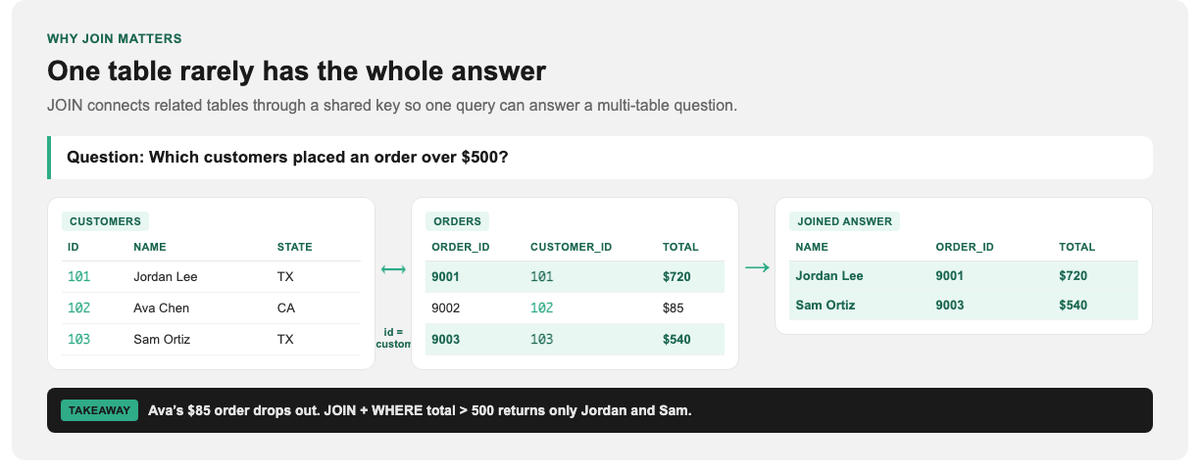
Names live in one table, totals in another. JOIN connects them.
| Clause | What it does |
|---|---|
WHERE |
Filters rows by a condition |
ORDER BY |
Sorts the results |
GROUP BY |
Groups rows to summarize (for example, total orders per customer) |
JOIN |
Combines data from two or more related tables |
COUNT / SUM / AVG |
Aggregate functions that calculate across rows |
The JOIN is where SQL gets genuinely powerful. It lets you answer questions that span multiple tables, like “which customers placed orders over $500,” by connecting the Customers and Orders tables.
Is SQL Hard to Learn?
SQL is widely considered one of the more approachable technical skills. The basic SELECT ... FROM ... WHERE pattern reads almost like English, and you can be writing useful queries within a few hours. The depth comes later: joins, subqueries, window functions, and performance tuning. The on-ramp is gentle, which is a big part of why SQL is so widely learned across both technical and business roles.
Learning SQL the Practical Way
The fastest way to learn SQL is to write queries against real data, not just read about syntax. StormWind Studios offers live, instructor-led SQL and data training where you practice on realistic datasets with an expert who can answer questions in real time. That is the kind of hands-on guidance that turns “I’ve read about joins” into “I can actually write one.” It is a natural next step whether you are an analyst leveling up or a professional who is tired of waiting on someone else to pull your data.
Start with Beginner to T-SQL for hands-on querying fundamentals, then go deeper with 70-761: Querying Data with Transact-SQL when you are ready for a fuller Microsoft SQL Server path. If your goal is reporting and dashboards more than writing queries all day, PL-300: Microsoft Power BI Data Analyst is a strong companion track.
Frequently Asked Questions
Is SQL a programming language?
SQL is a query language, designed specifically for working with data in relational databases. It is more specialized than general-purpose languages like Python, but it is genuinely powerful within its domain.
How long does it take to learn SQL?
You can write basic queries within a few hours and become genuinely productive in a few weeks of practice. Mastering advanced features takes longer.
What is the difference between SQL and MySQL?
SQL is the language; MySQL is one specific database system that uses SQL. Others include PostgreSQL, SQL Server, and SQLite. They all speak SQL with minor dialect differences.
Do I need to know how to code to learn SQL?
No. SQL is often the first technical skill non-developers learn, precisely because its core syntax is so readable.
Is SQL still worth learning in 2026?
Yes. Data continues to grow, and SQL remains the standard way to access and analyze it. It is one of the most consistently in-demand skills across tech, analytics, and business roles.