Access Point vs Router vs Extender: Which One Do You Need?
• Nathaniel Miller
The access point vs router vs extender choice is not a branding question. A router connects networks and usually runs DHCP and NAT. An access point bridges Wi-Fi clients onto that existing network over Ethernet. A range extender rebroadcasts Wi-Fi with no cable, and it typically cuts throughput by about 50%. Pick the wrong box and you either get double NAT or a slow dead-spot “fix” that becomes the new bottleneck.
The confusion is understandable. The device most people have at home is all three functions in one enclosure. Once you are solving a real coverage or performance problem, the distinction matters. Two of these devices fix problems. One of them frequently creates them.
For how enterprise APs are architected (standalone, controller, cloud), start with what a wireless access point is. For multi-site fleets, see cloud-managed access points.
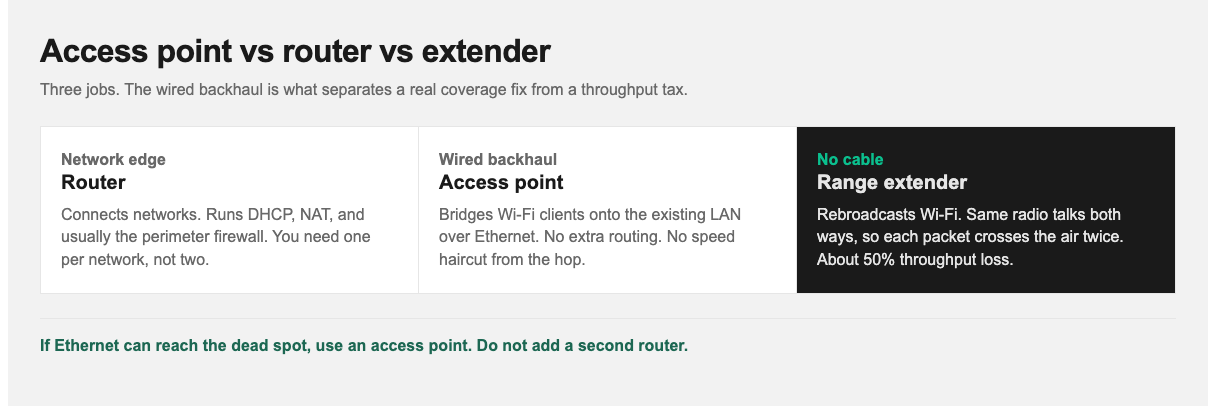
The critical split: an access point has a wired connection back to the network. A range extender does not.
The One-Sentence Difference
- Router: connects your network to another network (usually the internet) and directs traffic between them.
- Access point: adds Wi-Fi coverage to a network, connected back to it by Ethernet.
- Range extender: catches an existing Wi-Fi signal and rebroadcasts it, with no cable required and a significant performance penalty.
That wired-vs-wireless backhaul difference explains nearly all of the performance gap between an AP and an extender.
Side by Side
| Router | Access point | Range extender | |
|---|---|---|---|
| Primary job | Connect and route between networks | Extend the network via Wi-Fi | Rebroadcast existing Wi-Fi |
| Assigns IP addresses | Yes (DHCP) | No | No |
| Needs Ethernet to the network | Yes (WAN) | Yes | No |
| Throughput impact | None from the radio path | None from the radio path | About 50% loss |
| Adds latency | Minimal | Minimal | Yes |
| Typical use | Network edge | Adding coverage properly | Quick fix for one dead spot |
| Scales to many units | One per network | Yes | No. Degrades badly |
What a Router Does
A router sits at the boundary between networks and decides where traffic goes. In a home or small office it typically handles:
- Routing between your local network and the internet
- NAT: letting many internal devices share one public IP address
- DHCP: assigning IP addresses to devices on your network
- Firewalling: basic protection at the perimeter
You need exactly one device performing these roles per network. That is the source of the most common small-office networking error: adding a second router and ending up with two DHCP servers and two NAT layers (double NAT). Symptoms include devices that cannot see each other, broken port forwarding, and video calls or games that fail in ways that are miserable to diagnose.
If you already own a spare router and only need coverage, put it in access point mode instead of standing up a second network. The steps are later in this post.
What an Access Point Does
An access point does one thing: it bridges Wi-Fi clients onto a wired network. No routing, no DHCP, no NAT. Devices connected to it receive addresses from your existing router and sit on the same network as everything else.
That is why access points are the correct way to extend coverage:
- No throughput penalty. Backhaul is a cable, so clients can use the full radio rate the AP and switch will support.
- Devices stay on one network. Printers, file shares, and casting work as expected.
- It scales. Two, ten, or fifty APs all work the same way, each with its own wired connection.
The requirement is Ethernet to each AP location, which is exactly what people are trying to avoid when they buy an extender instead. In offices, that cable is also how you deliver PoE. Skipping it is how “we just needed one more room” turns into a permanent performance complaint.
What a Range Extender Does (and Its Real Cost)
A range extender receives Wi-Fi from your router or AP and rebroadcasts it. The appeal is obvious: no cabling, plug it into a socket, done.
The cost is larger than the box suggests. The extender uses the same radio to talk to your upstream device and to your clients. It receives a packet, then retransmits it, so every packet crosses the air twice. That halves available throughput for anything connected through it, before you account for placement: the extender is typically sitting where signal is already weak, so it is working from a compromised uplink to begin with.
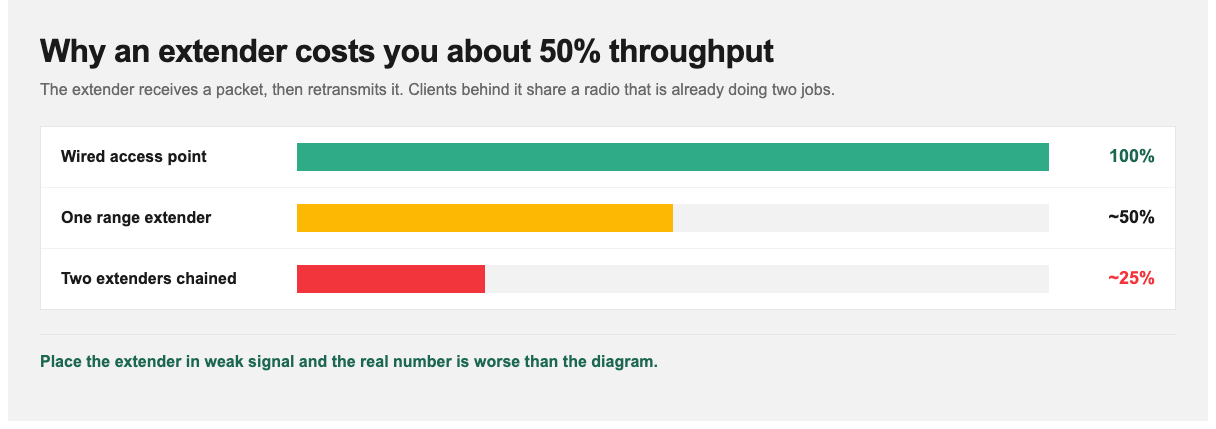
Same radio, two hops. Chain a second extender and you can be down to about a quarter of original throughput.
Additional problems worth knowing:
- Added latency from the store-and-forward hop, noticeable on calls and gaming.
- Contention. The extender competes for the same airtime as the clients it serves.
- Sticky clients. Devices often stay attached to the extender after moving back near the router, or the reverse.
- Chaining makes it worse. Two extenders in series can leave you with about a quarter of original throughput.
When an extender is still the right answer: one specific dead spot, low-bandwidth needs (a thermostat, a doorbell camera, a guest room used occasionally), running cable is genuinely impossible, and you accept the performance hit. That is a narrow but real set of cases. Extenders are not useless. They are widely misapplied.
Where Mesh Systems Fit
Mesh systems occupy the middle ground and are often the pragmatic answer for homes and small offices.
A mesh system uses multiple coordinated nodes presenting one network, with client steering between them. Good mesh systems improve on plain extenders in two ways: they handle roaming so clients move between nodes cleanly, and better systems use a dedicated backhaul radio so the link between nodes does not compete with client traffic. That mitigates the halving problem. It does not always eliminate it.
Most mesh nodes also support wired backhaul. Run Ethernet where you can and the mesh node becomes, functionally, a well-integrated access point: full throughput plus seamless roaming.
Performance hierarchy, best to worst:
- Wired access points
- Mesh with wired backhaul
- Mesh with dedicated wireless backhaul
- Mesh with shared backhaul
- Range extender
Which One You Need
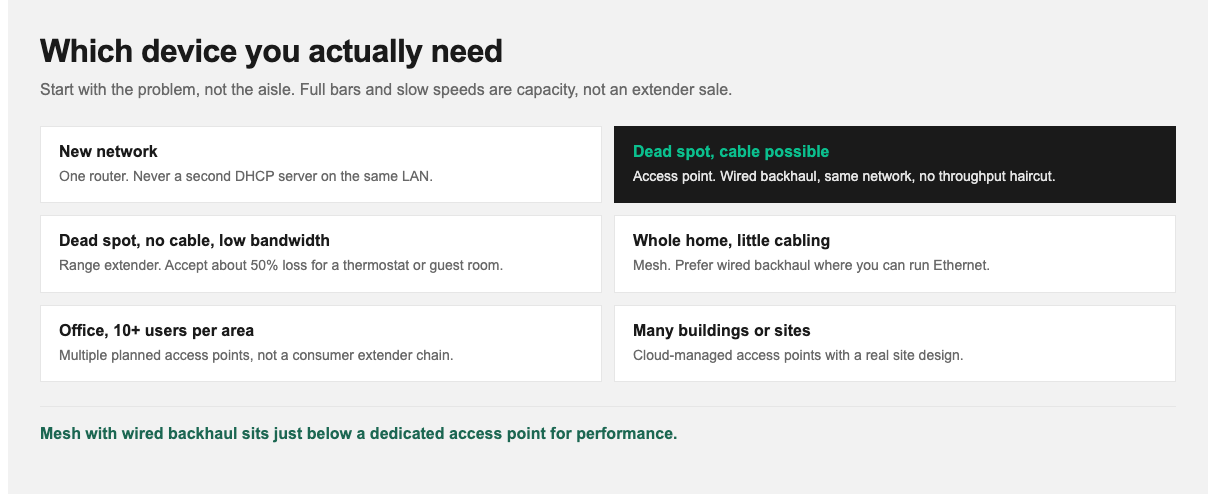
Diagnose coverage vs capacity before you buy. Full bars and slow speeds are not an extender problem.
| Your situation | Use this |
|---|---|
| Setting up a network from scratch | Router (one only) |
| Dead spot, Ethernet available or runnable | Access point |
| Dead spot, no cabling possible, low bandwidth | Range extender |
| Whole-home coverage, no cabling, want it to just work | Mesh system |
| Multi-floor space with some cabling | Mesh with wired backhaul |
| Office, 10+ users per area | Multiple access points, planned |
| Multiple buildings or sites | Cloud-managed access points |
One diagnostic before buying anything: check whether your problem is coverage or capacity. If you have full signal bars and slow speeds, adding an extender or AP in that spot will not help. You have a capacity or uplink problem. Signal strength and speed are different measurements. Conflating them wastes money. The hub post covers coverage vs capacity and site surveys in more detail.
Can You Use a Router as an Access Point?
Yes, and it is a useful trick if you have a spare router.
Most consumer routers include an “access point mode” or “bridge mode” that disables routing and DHCP, leaving the wireless and switching functions active. Enable that, connect it to your main network by Ethernet, and it behaves as an access point.
If yours has no such mode, you can usually get the same result manually:
- Disable DHCP on the second router. This is the essential step.
- Assign it a static IP on your main network’s subnet, outside your DHCP pool.
- Connect a LAN port on the second router to a LAN port on your main router. Do not use the WAN port. That is what creates double NAT.
- Set the SSID and security to match your main network for smoother roaming.
The result performs like a proper access point because the backhaul is a cable. It is not as clean as a purpose-built enterprise AP (no centralized management or coordinated radio tuning), but for a home or very small office it works and costs nothing extra.
Networking Skills and StormWind Training
These distinctions look simple written down. They still cause expensive mistakes: double NAT in branch offices, extenders dropped where capacity was the real constraint, APs installed without checking switch power budget.
If you are building the fundamentals, Raymond Lacoste’s CompTIA Network+ N10-009 course is 23 hours and includes wireless as part of core networking. Teams on a Cisco path should take CCNA 200-301 (40 hours live). Session 9 includes wireless networking. For RF, PoE, and WLAN architecture in depth, use CWNA-109.
A week-by-week CCNA plan is here: how to study for the CCNA. For where Network+ and CCNA sit on a longer path, see the IT certification roadmap for 2026.
Next Steps
Diagnose before you buy. Full bars with slow speeds is a capacity problem, and extra coverage will not fix it. If you need more coverage and can run Ethernet, use an access point. If you cannot run cable, a good mesh system beats a range extender in almost every case.
For enrollment or team training, visit stormwindstudios.com or reach out to [email protected].
Frequently Asked Questions
What is the difference between an access point and a router?
A router connects networks and directs traffic between them, assigning IP addresses. An access point only extends an existing network over Wi-Fi and requires an Ethernet connection back to that network.
Do range extenders really halve your speed?
Roughly, yes. The extender uses one radio to both receive from the upstream device and transmit to clients, so each packet crosses the air twice. Extenders or mesh nodes with dedicated backhaul radios reduce but do not always eliminate the penalty.
Is a mesh system better than an access point?
A wired access point delivers better raw performance. Mesh offers easier installation and seamless roaming without cabling. Mesh with wired backhaul gets you close to both.
Can I use my old router as an access point?
Yes. Disable DHCP, assign it a static IP on your main subnet, and connect LAN port to LAN port. Never the WAN port, which causes double NAT.
Why do I have full signal but slow internet?
That is a capacity or uplink problem, not coverage. Too many clients sharing airtime, an overloaded uplink, or channel interference. Adding coverage devices will not help.
How many access points do I need?
It depends on area, construction materials, and client density far more than square footage alone. Dense environments need more APs at lower power, not fewer at high power. A site survey is worthwhile for anything beyond a small office.
Can I have two routers on one network?
You can, but only one should perform routing and DHCP. Configure the second in access point or bridge mode to avoid double NAT.