Cloud-Managed Access Points: How They Work and When to Use Them
• Nathaniel Miller
Cloud managed access points move the management plane to a vendor-hosted platform. They do not send your users’ traffic through that vendor’s data center. A laptop talking to a file server on your LAN still goes from the AP to your switch to the server. That is why a brief internet outage is usually a dashboard problem, not a Wi-Fi outage. The part to model before you standardize is licensing: in most vendors’ models, if the per-AP subscription lapses, management of that AP stops.
Cloud-managed wireless is the default recommendation for multi-site organizations, and for good reason. It is not automatically cheaper over five to seven years, and it is not the right engineering choice for every campus, air-gapped plant, or high-density hall.
For AP types and RF design, use what a wireless access point is. For whether you even need an AP versus a router or extender, see access point vs router vs extender. Dan Goodman’s older 3 flavors of wireless access points post is still useful if you want the Cisco-specific vBlog detail.
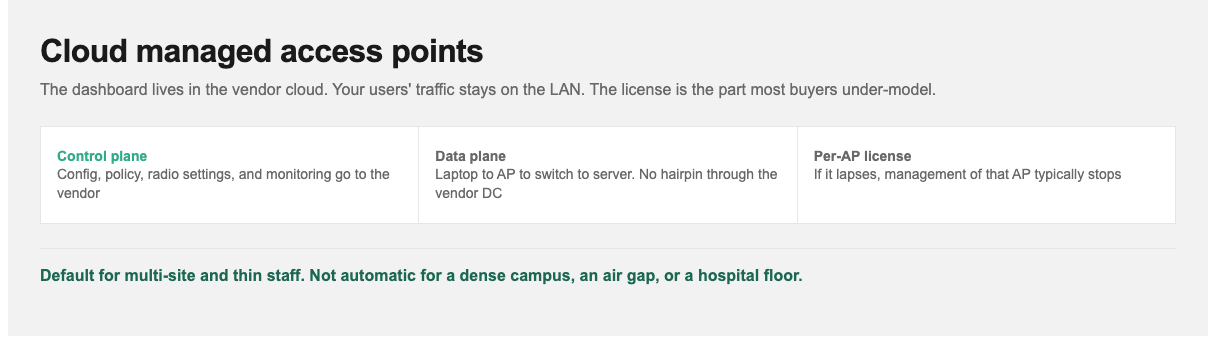
The architecture question is control plane versus data plane. The buying question is the subscription.
Control Plane vs Data Plane
Networking gear has two logical planes:
- The control plane decides how the device should behave: configuration, policy, radio settings, monitoring.
- The data plane moves actual user traffic.
With cloud-managed wireless, only the control plane moves to the cloud. Your users’ packets do not hairpin through the vendor’s data center. That is the distinction most “does the internet outage kill Wi-Fi?” questions are really asking, and it is also why this architecture does not add a cloud hop to every file copy.
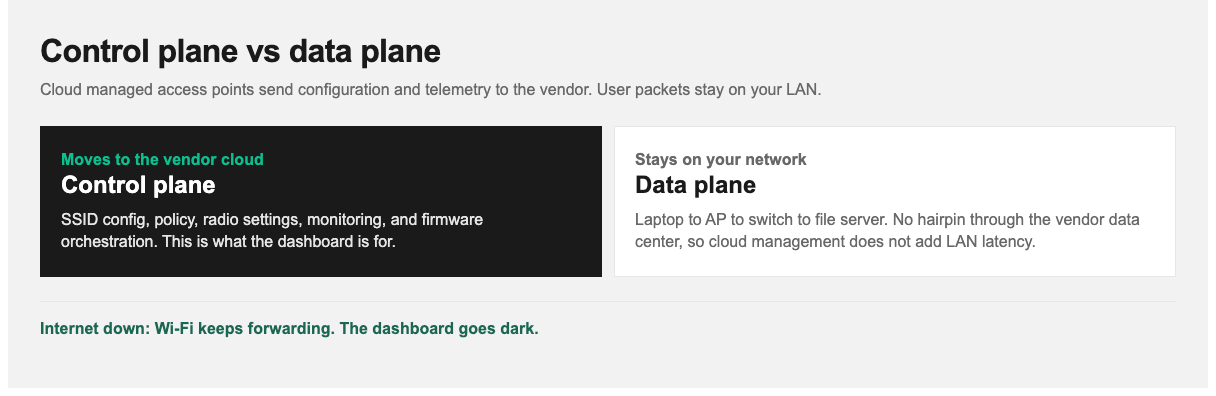
Only configuration and telemetry go to the cloud. User traffic stays local, which is why cloud management does not add LAN latency.
How It Differs From an On-Premises Controller
| On-premises controller | Cloud-managed | |
|---|---|---|
| Management location | Hardware or VM on your network | Vendor-hosted platform |
| Upfront cost | Higher: controller hardware, often a redundant pair | Lower: APs only |
| Ongoing cost | Support contracts | Mandatory per-AP subscription |
| Multi-site management | Harder: controller per site or complex tunneling | Straightforward: one dashboard |
| Remote deployment | Requires on-site expertise | Ship, plug in, configure centrally |
| Software updates | You plan and execute them | Vendor-managed, less control over timing |
| Works if internet drops | Fully. No dependency | Yes for existing clients; management unavailable |
| Data sovereignty | Everything stays on-premises | Metadata in vendor cloud, possibly cross-border |
| Expertise required | Higher | Lower |
What Happens When the Internet Goes Down
What keeps working: already-associated clients stay connected. Local traffic continues to flow. APs retain their last-known configuration and keep serving their SSIDs. In most implementations, clients can still authenticate against local RADIUS if that is how you configured it.
What stops working: the management dashboard is unreachable, so you cannot change configuration or view live monitoring. Cloud-hosted captive portals for guest access typically fail. If authentication depends on a cloud identity provider, new logins may fail. That last one is an identity dependency, not a wireless one.
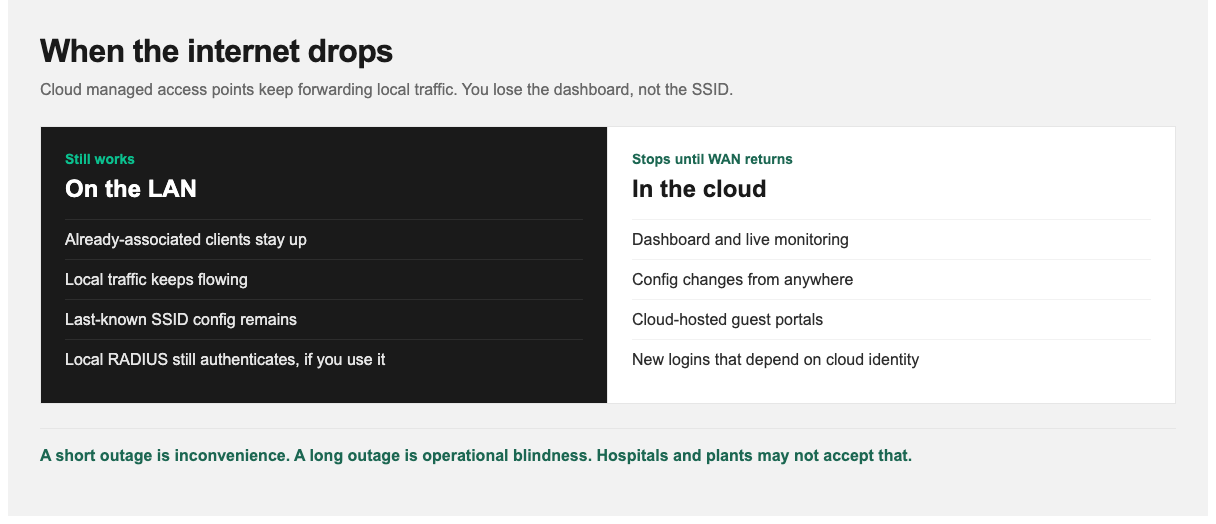
A short outage is a management inconvenience. An extended outage is operational blindness.
A short outage is a management inconvenience, not a wireless outage. An extended outage becomes a real operational problem because you are flying blind and cannot make changes. For most branch networks that is acceptable. For a hospital floor or a manufacturing line, it may not be.
Licensing: Model It Over the Life of the Hardware
Cloud-managed access points require an active per-AP subscription license. This is not a support contract you can let lapse and still keep operating as if nothing changed. In most vendors’ models, when the license expires, management of that AP stops. Depending on the vendor, an unlicensed AP may continue serving its last configuration, or it may cease functioning as a managed device entirely.
What that means in practice:
- The hardware is the entry cost to an operating expense, not a one-time capital purchase you can ignore after year one.
- Total cost of ownership needs a multi-year view. Cloud often looks cheaper in year one and can be more expensive by year five. Model it over the equipment’s realistic life (five to seven years), not the first budget cycle.
- Renewal is not optional leverage-wise. Once you are deployed across sites, declining renewal means replacing hardware. Understand that before you standardize.
- Licenses are usually term-based per AP, commonly one, three, five, or seven years, with longer terms discounted. Aligning license terms with your hardware refresh cycle avoids paying for licenses on gear you are about to retire.
None of this makes cloud management a bad choice. The operational benefits are real. Evaluate it as a subscription commitment, because that is what it is.
Cloud-Managed vs On-Premises: When to Use Which
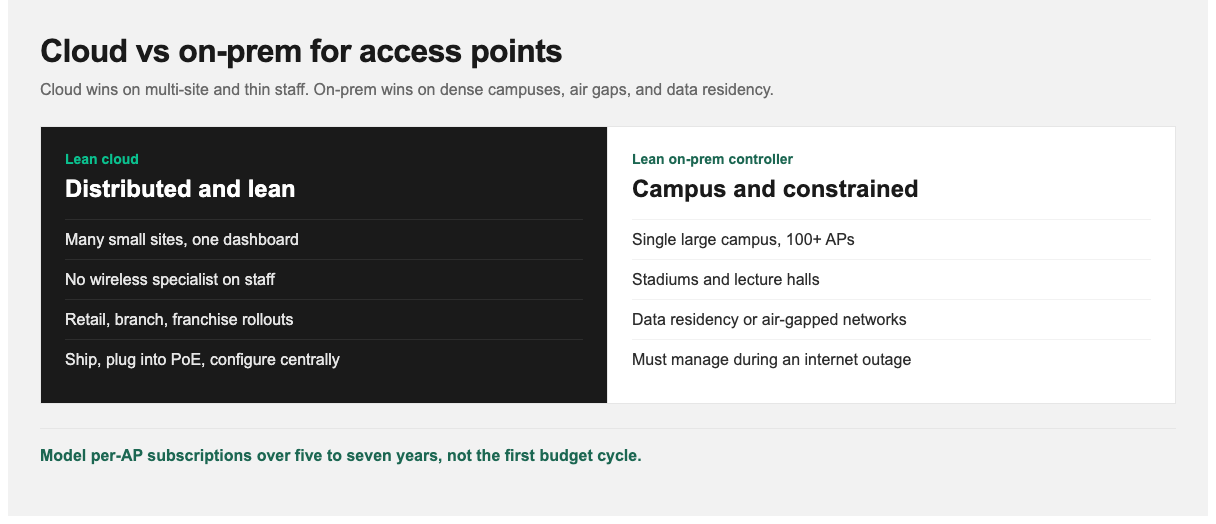
Multi-site and thin staff point to cloud. Dense campuses, air gaps, and data residency often point on-prem.
| If this describes you | Lean toward |
|---|---|
| Multiple sites, especially many small ones | Cloud. This is its decisive advantage |
| No dedicated wireless specialist on staff | Cloud. Lower expertise barrier |
| Retail, branch, or franchise networks | Cloud. Remote deployment without site visits |
| Rapid growth or frequent site changes | Cloud. Adding a site is adding APs |
| Single large campus, 100+ APs | On-premises. Controller economics improve at scale |
| Very high density (stadiums, lecture halls) | On-premises. Finer radio control |
| Strict data residency requirements | On-premises. Avoids cross-border metadata questions |
| Air-gapped or highly restricted networks | On-premises. Cloud may be impossible |
| Prefer CapEx over OpEx | On-premises. Cloud is structurally OpEx |
| Must manage the network during an internet outage | On-premises |
The Main Platforms
This is a map, not a ranking. The right choice depends heavily on what you already run.
Cisco Meraki is the most widely deployed cloud-managed platform and effectively defined the category. Strengths are dashboard usability and breadth: wireless, switching, security appliances, and cameras in one place, which is valuable for small IT teams running an entire branch stack. Its licensing model is also the strictest example of the subscription dynamic above. Understand that before you standardize on it.
If you are already on Meraki, StormWind’s Implementing Cisco Meraki Access Points is 6 hours with Shane Sexton: architecture, licensing, dashboard setup, SSID and radio config, and troubleshooting. The same instructor also covers Meraki switches (4 hours) and Meraki firewalls (4 hours) if the branch stack is Meraki end to end.
Other credible options:
- Ubiquiti UniFi: notably lower cost, with self-hosted or cloud controller options and no mandatory per-AP subscription. Popular with smaller organizations and cost-sensitive deployments.
- HPE Aruba Central: strong in enterprise environments already invested in Aruba.
- Cisco Catalyst wireless with cloud monitoring: a middle path if you want cloud visibility with on-premises control.
The practical selection criterion is your existing estate. Unified management across a vendor you already operate usually beats a marginally better wireless feature set from a net-new stack.
What a Rollout Actually Looks Like
The remote deployment story is the strongest operational argument for cloud management:
- Pre-configure centrally. Create the site in the dashboard and define SSIDs, VLANs, and policy before hardware ships.
- Claim the APs by serial number and associate them with that site.
- Ship to site. Someone non-technical plugs each AP into a PoE switch port.
- The AP calls home, authenticates, and pulls its configuration.
- Verify remotely from the dashboard.
No engineer travels. For an organization opening branches regularly, that is the difference between a site visit per opening and a shipping label, which is why this model dominates distributed retail.
What still requires real planning: AP placement and count, switch PoE budget, VLAN and network design, and RF in dense areas. Cloud management simplifies configuration. It does not eliminate wireless design. Skip the site survey because the dashboard is easy, and you still get bad Wi-Fi. You just get it faster.
When On-Premises Is Still Right
Cloud is the default recommendation now. Defaults still deserve a second look:
- Large single campuses. Controller cost amortizes well across 100+ APs, and per-AP subscriptions add up quickly at that scale.
- Extreme density. Stadiums, auditoriums, and lecture halls benefit from the granular radio control that on-premises controllers expose.
- Regulatory constraints. Some sectors cannot accept management metadata leaving their jurisdiction.
- Isolated networks. Air-gapped or heavily restricted environments may not permit cloud connectivity at all.
- Operational independence. Losing management visibility during an internet outage is unacceptable.
Skills Your Team Still Needs
Cloud management lowers the expertise barrier. It does not remove it. The dashboard abstracts configuration, not physics.
Your team still needs RF fundamentals (why more APs at lower power outperform fewer at high power), the difference between coverage and capacity, VLAN design for guest and IoT segregation, PoE power budgeting, and how to read the diagnostics the dashboard provides. Cloud platforms surface excellent telemetry. It is only useful to someone who knows what channel utilization or retry rates actually indicate.
The networking and wireless underneath every vendor GUI is what StormWind teaches:
- CWNA-109 (Michael Friedrich, 11 hours): vendor-neutral RF, 802.11, PoE, WLAN architectures, WPA3, and validation. That is the course for “the dashboard is green and the Wi-Fi is still bad.”
- CompTIA Network+ N10-009 (Raymond Lacoste, 23 hours): switching, VLANs, and wireless fundamentals around any AP deployment.
- Cisco CCNA 200-301 (40 hours live): Session 9 includes wireless networking. Pair it with how to study for the CCNA if you need a 10-week plan.
For a broader cert sequence, see the IT certification roadmap for 2026.
Next Steps
If you run multiple sites or lack a dedicated wireless specialist, cloud-managed is likely the right architecture. Model the licensing cost over five to seven years before committing, and align license terms with your hardware refresh cycle. If you are a single large campus, run the numbers against an on-premises controller before assuming cloud is cheaper.
For enrollment or team training, visit stormwindstudios.com or reach out to [email protected].
Frequently Asked Questions
Does my Wi-Fi stop working if the internet goes down?
No. Only the management plane is cloud-hosted, so existing clients stay connected and local traffic keeps flowing. You lose the dashboard, live monitoring, and cloud-hosted guest portals until connectivity returns.
Does user traffic go through the vendor’s cloud?
No. In standard cloud-managed architectures, user traffic stays local. Only configuration and telemetry go to the cloud. That is why cloud management does not add latency to LAN traffic.
What happens if I do not renew the license?
It depends on the vendor, but in most models management of the AP stops when its license lapses. Treat cloud-managed hardware as a subscription commitment, not a one-time purchase.
Is cloud-managed Wi-Fi cheaper than an on-premises controller?
Usually in year one, because there is no controller hardware. Over five to seven years the per-AP subscriptions often make it more expensive, particularly at large single-site scale. Model total cost over the equipment’s real life.
Is cloud-managed wireless secure?
The architecture is sound: management traffic is encrypted, and user traffic does not traverse the vendor cloud. The real considerations are data residency for management metadata, and the fact that your management plane depends on a third party’s availability.
Can I mix cloud-managed and on-premises wireless?
Generally yes, though managing two architectures adds operational overhead. Some organizations run cloud-managed at branches and controller-based at headquarters, which is a reasonable split.
Do I still need a site survey with cloud-managed APs?
Yes. Cloud management simplifies configuration, not radio physics. AP placement, count, and power planning matter as much as with any other architecture.