What Is a Wireless Access Point? Types, Uses, and How They Work
• Nathaniel Miller
If Wi-Fi is bad, it is rarely because someone bought a cheap radio. It is usually how the wireless access point was architected, placed, powered, and managed. An access point extends a wired network to Wi-Fi clients. There are three architectures: standalone, controller-based, and cloud-managed. Choosing the wrong one for your organization’s size is one of the most expensive avoidable mistakes in network design.
This guide covers what an AP does, how it sits in the LAN, how the three types differ, and how to choose. If you are stuck on the box on the shelf, see access point vs router vs extender. If you are deciding on a dashboard-driven fleet, see cloud-managed access points.
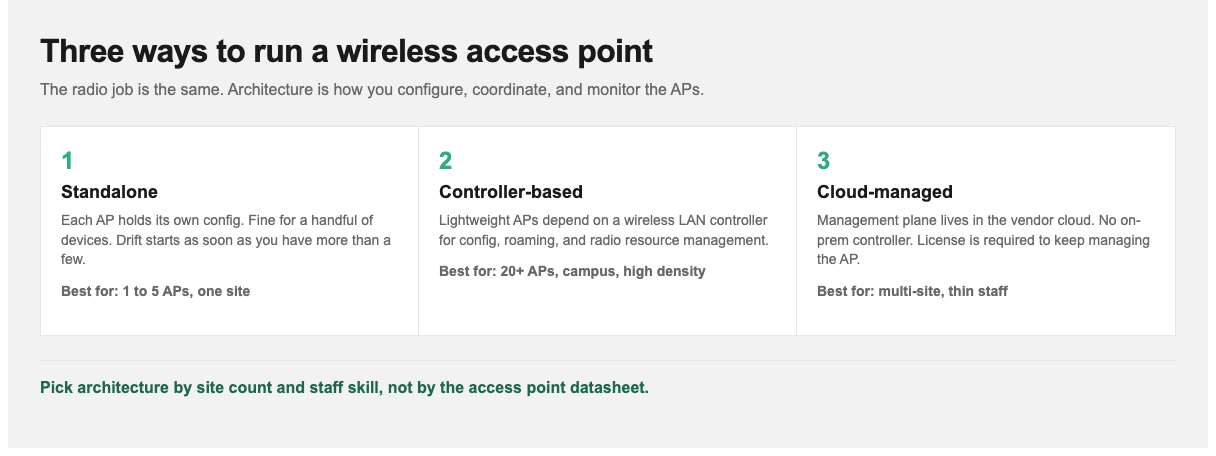
Same radio job. The architecture is how you configure, coordinate, and monitor the APs.
What a Wireless Access Point Actually Does
An access point creates a wireless LAN by bridging Wi-Fi clients onto a wired network. It receives data over Ethernet, transmits it as a radio signal, and does the reverse for traffic coming back.
That function does not change much from a closet AP in a five-person office to a lecture-hall deployment. What changes is how APs are managed, and that is where architecture (and budget) lives.
An access point is not a router. A router connects different networks and routes traffic between them. An AP only extends an existing network wirelessly. Most consumer “wireless routers” are a router, a switch, and an access point in one box, which is why the terms blur at home and stop blurring in the enterprise. Putting a second router on a production LAN when you needed an AP is how teams end up with double NAT and devices that cannot see each other.
How an Access Point Fits in the Network
In a typical business network:
- Internet arrives at a firewall or edge router.
- That connects to a core or distribution switch.
- Access switches provide Ethernet ports across the building.
- Access points connect to those access switches, usually powered by Power over Ethernet (PoE), so a single cable carries data and power.
- Wireless clients associate with the nearest suitable AP.
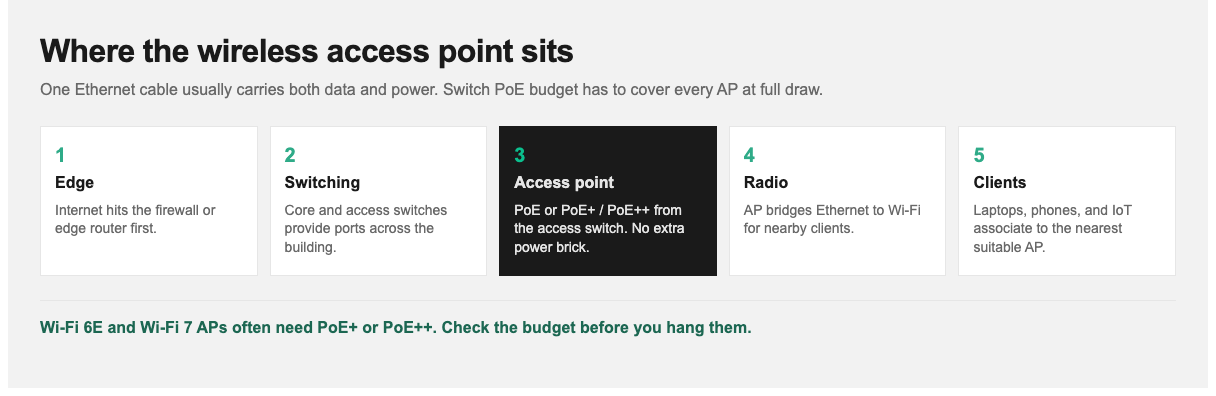
PoE is a design constraint. Switch power budget has to cover every AP at full draw.
PoE is not a footnote. Your switches must supply enough power across all connected APs. Modern Wi-Fi 6E and Wi-Fi 7 access points draw more than earlier generations, often requiring PoE+ or PoE++ rather than standard PoE. Upgrading APs without checking switch power budget is a routine, predictable failure: the units boot, then they do not run all radios at full capability.
Uplink speed is the other cable constraint. A Wi-Fi 6 AP that can push multi-gigabit traffic into a 1 Gbps switch port is limited by the wire, not the radio.
The Three Types of Access Point
Standalone (autonomous) access points
Each AP is configured and managed individually. It holds its own configuration and operates independently.
Good for: very small deployments, about 1 to 5 APs, a single site, a small office.
The problem: management does not scale. Every SSID or security change means a login per device. Ten APs means ten chances for configs to drift. There is also no coordination between APs, so they cannot hand clients off intelligently or manage channel interference as a group.
Controller-based (lightweight) access points
APs are “lightweight.” They hold minimal configuration and depend on a central wireless LAN controller (WLC) that manages them collectively. The controller pushes configuration, coordinates radio settings, and manages client roaming.
Good for: medium to large single-site or campus deployments, roughly 20 APs upward, especially where seamless roaming matters.
What you gain: centralized configuration, coordinated radio resource management (APs negotiate channels and power to cut interference), faster roaming as clients move, and centralized monitoring.
What you give up: the controller is a cost and a potential single point of failure. Production designs usually need a redundant pair. You also need people who know how to run it. For the Cisco-specific version of this choice, including why a lightweight AP is a brick without a WLC, see Dan Goodman’s autonomous vs lightweight access points vBlog.
Cloud-managed access points
The management plane moves to a vendor-hosted cloud platform. APs connect out to that platform for configuration and monitoring. There is no on-premises controller. Vendors in this model include Cisco Meraki, HPE Aruba, and Ubiquiti, among others.
Good for: multi-site organizations, distributed retail or branch networks, and teams without a dedicated wireless specialist.
What you gain: no controller hardware, one dashboard across sites, and simple remote deployment. An AP can ship to a branch, get plugged in by someone non-technical, and pull its config centrally.
What you give up: ongoing subscription licensing, and a dependency on vendor cloud availability. In most models the license is not optional. If it lapses, management of that AP stops. The cloud-managed access points guide covers control plane vs data plane, outages, and total cost.
Choosing Architecture by Organization Size
| Situation | Recommended architecture | Why |
|---|---|---|
| 1 to 5 APs, single site | Standalone | Management overhead is tolerable; a controller is hard to justify |
| 5 to 20 APs, single site | Cloud-managed | Past standalone’s practical limit; avoids controller cost and expertise |
| 20+ APs, single site or campus | Controller-based | Radio coordination and fast roaming justify the controller |
| Multiple sites, any size | Cloud-managed | Multi-site management is where cloud is decisively better |
| High density (auditoriums, lecture halls) | Controller-based | Needs careful radio management and capacity planning |
| Strict data sovereignty or air-gapped | Controller-based | Cloud dependency may be unacceptable or impossible |
Treat the table as a starting point, not a procurement rule. A 15-AP office that already runs Cisco switching may still prefer a small controller. A 40-AP retailer with no wireless engineer on staff will usually be happier in the cloud.
For the original instructor walkthrough of the same three models (autonomous, cloud, split-MAC), watch Dan Goodman’s 3 flavors of wireless access points. That vBlog is the place for the video and the split-MAC data-plane vs management-plane explanation. This guide is the updated architecture and design version.
Wi-Fi Standards That Matter Now
| Standard | Name | Key point |
|---|---|---|
| 802.11ac | Wi-Fi 5 | Still widely deployed; 5 GHz only |
| 802.11ax | Wi-Fi 6 | Efficiency under load: OFDMA and better scheduling |
| 802.11ax | Wi-Fi 6E | Wi-Fi 6 into the 6 GHz band: more clean spectrum |
| 802.11be | Wi-Fi 7 | Higher throughput, multi-link operation, lower latency |
Wi-Fi 6’s biggest advantage is not peak speed. It is efficiency when many clients share an AP. Earlier standards degraded badly under load. That matters more in real offices than headline throughput numbers.
Two practical caveats. First, 6 GHz has shorter range than 5 GHz, so coverage design changes: more spectrum, less reach. Second, clients must support the standard too. A Wi-Fi 7 AP serving Wi-Fi 5 laptops delivers Wi-Fi 5 performance. Align AP upgrades with the device refresh cycle. Do not lead it.
Coverage vs Capacity (Why Site Surveys Exist)
The most common wireless design mistake is planning for coverage when the actual problem is capacity.
Coverage asks: can devices get a usable signal everywhere they need one? Capacity asks: can the network handle the number of devices and the traffic they generate in a given area?
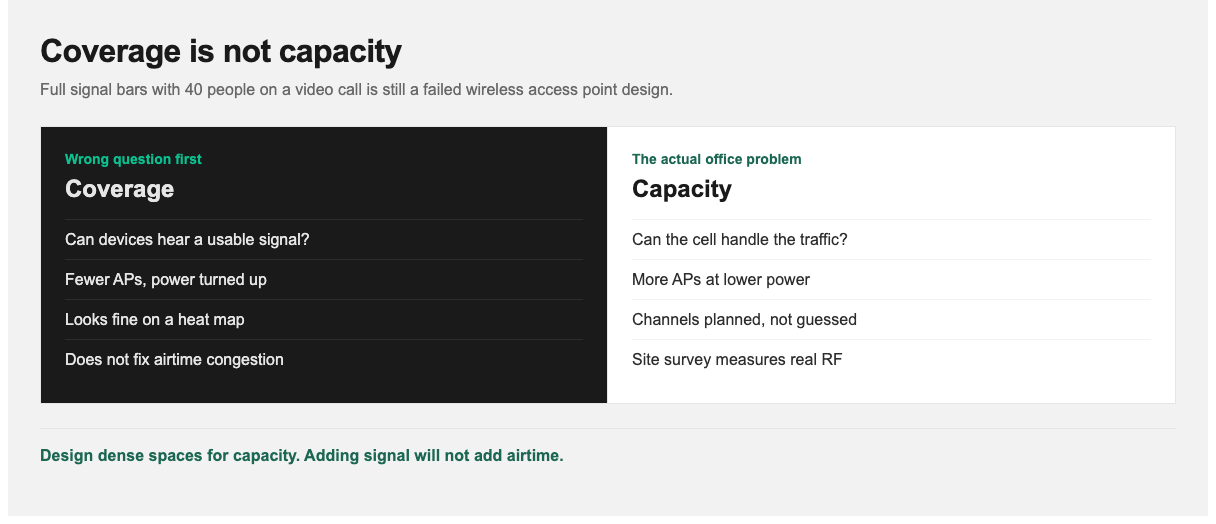
A conference room with full bars and 40 people on video is a capacity problem. More signal will not fix it.
Modern design in dense environments is mostly about capacity: more APs at lower power, carefully channelized, rather than fewer APs turned up loud.
A site survey measures how radio actually behaves in your building, not how a floor plan suggests it should. Predictive surveys model from building materials. Passive and active surveys measure real signal. Drywall is nearly transparent to RF. Concrete and metal are not. Foil-backed insulation and elevator shafts create dead zones no CAD drawing predicts.
Common Deployment Mistakes
- Too much transmit power. Maximum power creates overlapping cells, co-channel interference, and clients that cling to a distant AP instead of roaming to a nearer one. Lower power with more APs almost always performs better.
- Ignoring 2.4 GHz channel limits. The band has three non-overlapping channels: 1, 6, and 11. Anything else guarantees interference.
- Mounting APs badly. Above a suspended ceiling, in a metal cabinet, or behind ductwork all attenuate signal. APs generally belong on the ceiling, below obstructions, with antennas oriented as designed.
- Insufficient PoE budget. Discovered after install, when APs will not power up at full capability.
- Uplink starvation. Multi-gigabit radios on 1 Gbps ports.
- No plan for guest and IoT traffic. Separate SSIDs mapped to segregated VLANs should be designed in from the start, not retrofitted after a security review.
Wireless Skills and StormWind Training
Wireless is a real specialization. It involves radio physics that general networking training does not cover in depth.
- CWNA-109 (Certified Wireless Network Administrator) is the vendor-neutral foundation: RF, 802.11, PoE, WLAN architectures, WPA3, and validation. That is the course if you need to understand wireless, not one vendor’s GUI.
- CompTIA Network+ N10-009 (Raymond Lacoste, 23 hours, beginner) covers wireless fundamentals as part of core networking. Use it when wireless is one of several responsibilities, not your whole job.
- Cisco CCNA 200-301 is 40 hours live. Session 9 includes wireless networking. It is the right next step if you are already on a Cisco path. For a week-by-week plan, see how to study for the CCNA.
If you are mapping certs around this work, the IT certification roadmap for 2026 shows where Network+ and CCNA sit relative to the rest of the catalog.
Next Steps
Identify the architecture your situation actually calls for. The size table above resolves most cases. If you already have APs and a pile of tickets, check transmit power and whether the complaint is capacity rather than coverage before you buy anything. Those two checks close a surprising share of “the Wi-Fi is bad” reports.
For enrollment or team training, visit stormwindstudios.com or reach out to [email protected].
Frequently Asked Questions
What is a wireless access point?
A networking device that extends a wired network to Wi-Fi devices, bridging wireless clients onto the wired LAN. It does not route between networks. That is a router’s job.
What are the three types of access point?
Standalone (autonomous), controller-based (lightweight), and cloud-managed. They differ in how they are managed, not in the basic radio function.
How many devices can one access point handle?
It depends on the AP generation and traffic type. A modern Wi-Fi 6 AP comfortably handles about 50 to 100 typical office clients, but high-bandwidth use like video conferencing reduces that substantially. Design for capacity, not the vendor’s maximum client count.
Do I need a wireless controller?
Generally once you exceed roughly 20 APs on a single site, or when seamless roaming and coordinated radio management matter. Below that, cloud-managed or standalone is usually more sensible.
Is Wi-Fi 7 worth upgrading to?
Only if your client devices support it and your current network is actually constrained. A Wi-Fi 7 AP serving older clients delivers older-client performance, so align AP upgrades with device refresh cycles.
Why is my Wi-Fi slow despite full signal bars?
Almost always capacity rather than coverage: too many clients or too much traffic for the available airtime. It can also be an uplink bottleneck or interference from overlapping channels. Signal strength alone tells you very little.
Should access points be on the ceiling?
Usually yes: below obstructions, not above suspended ceilings or inside metal enclosures, with antennas oriented as the manufacturer designed.